TabEye turns any product page into a restock alert. It watches the page in your own browser and tells you the second "sold out" flips to "add to cart", with a sound, a Discord message or a Telegram ping. Free, no account, no bot queues.
Why a browser-based restock alert works
Most restock trackers are services that crawl product pages from their own servers. That means shared crawlers, rate limits, delays measured in minutes, and pages behind a login are out of reach. TabEye checks from your own Chrome tab instead: your session, your login, your region and your pricing, checked as often as every 5 seconds.
Because the check happens in your browser, TabEye also works on shops that block server-side crawlers, and it can jump you straight to the tab the moment stock appears so you can check out before the queue forms.
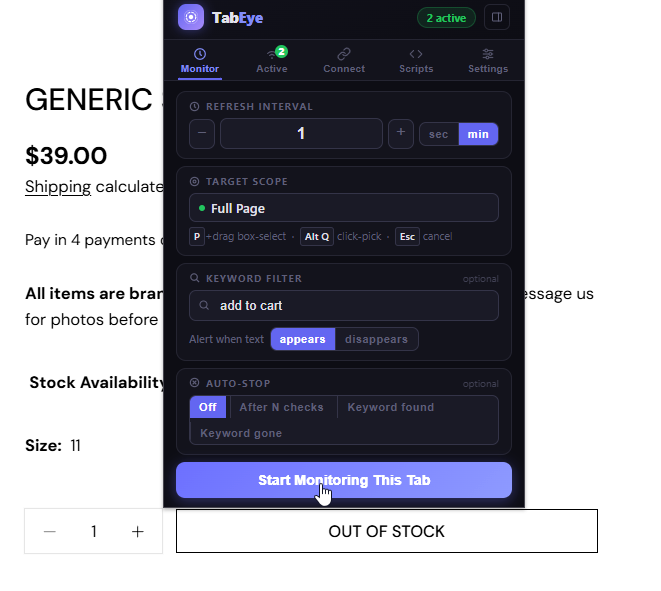
Click the TabEye icon. On the Monitor tab, set the check interval. Every 10 seconds is a good starting point for a hyped drop; every 1 to 5 minutes is plenty for a slow restock.
Type add to cart into the keyword field and set it to appears. TabEye now ignores everything else on the page and alerts only when that text shows up. Watching for sold out to disappear works just as well.
Optional but recommended: press P on the page and drag a box around the stock button, so banners and "recently viewed" widgets can never trigger a false alarm.
Click Start Monitoring This Tab and go do something else. When stock lands you will hear it, see it, or get a message.
Screenshot: keyword "add to cart" set to appears on a sold-out sneaker page.
Get the alert on your phone
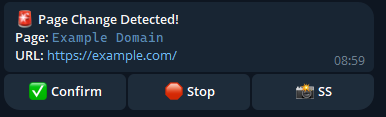
Drops rarely wait until you are at your desk. Connect a Telegram bot or a Discord webhook in TabEye's Connect tab and the restock alert reaches your phone wherever you are. With Telegram you can even reply /screenshot 1 to see the page before you run to a computer. The documentation walks through both setups.
Screenshot: a TabEye change message arriving through Telegram.
Tips for drop day
Turn on focus on alert in Settings and TabEye switches you to the product tab the instant stock is detected.
Use Instant detection mode for drops; speed matters more than filtering flickers.
Set auto-stop to Keyword found so the monitor shuts itself off once you have caught the restock.
If the shop starts showing a CAPTCHA, TabEye alerts you separately so you can solve it and keep the watch alive. Raising the interval to 30 to 60 seconds usually prevents it entirely.
Restock alert questions
Does it work while I'm in another tab or app?
Yes. Once the product page is being watched you can switch to other tabs, windows or apps. TabEye keeps checking on schedule and alerts you when stock appears.
How fast can it check for a restock?
As often as every 5 seconds, per tab. Each watched product can have its own interval, so a hyped sneaker drop and a slow-moving console restock can run side by side.
Does it work on shops that need a login?
Yes. TabEye watches the page in your own browser session, so anything you can see while logged in, it can watch. Member-only drops and region-specific stores work like any other page.
Is it really free?
Yes. There is no account, no subscription and no per-check limit. Install it and start watching.
Catch the next drop
Put the product page on watch now. It takes less than a minute.
 TabEye